Start informed.
Bring relevant decisions, project history, and procedures into the next session before the background has to be rebuilt.
Briefings · recall · provenanceFirekeep gives your team and connected agents one self-hosted Keep for shared knowledge, live context, handoffs, and inspectable work history—across sessions, tools, and machines.
Claude Code, Codex, Kiro, OpenCode, and Pi can work from the same durable context—and so can any other MCP client. Where a client exposes supported hooks, Firekeep adds automatic briefings and lifecycle guidance.
01 / shared progress
Firekeep carries selected decisions, procedures, and working state between the agents and people you connect—without replacing the tools they already use.
Bring relevant decisions, project history, and procedures into the next session before the background has to be rebuilt.
Briefings · recall · provenanceGoals, plans, decisions, and progress remain available through context compression, handoffs, and new machines.
Goals · plans · working stateKeep a useful lesson with provenance so the next teammate or agent can use it in context.
Skills · handoffs · evidenceLess reconstruction. Clearer handoffs. Each useful session improves the starting point for the next.
Supported runtime hooks can deliver briefings and lifecycle guidance automatically; other connected MCP clients recall the same Keep through its tool surface.
Set up shared memory between Claude Code and Codex
02 / personal → shared
Start with your own projects and machines. Add teammates to the same complete product when context should travel across people, roles, and tools.
Your decisions, active goals, selected folders, and hard-won fixes stay available across connected sessions and machines.
Project context, procedures, handoffs, and evidence remain connected to the people and projects they came from.
Chosen runbooks, internal documents, code structure, and operating history return inside everyday AI-assisted work.
One place. More contributors. A richer starting point for every connected agent.
Folders added through Docdex are member-private by default, even on a shared Keep. Share with the workspace only when you intend to.
New 03 / Firekeep Studio · latest stable
Firekeep Studio brings Codex, Claude Code, Kiro CLI, and Grok into one desktop workspace. Choose who leads, bring in a fresh reviewer, and turn important goals into Missions with visible checks and human acceptance.
Installation and quick start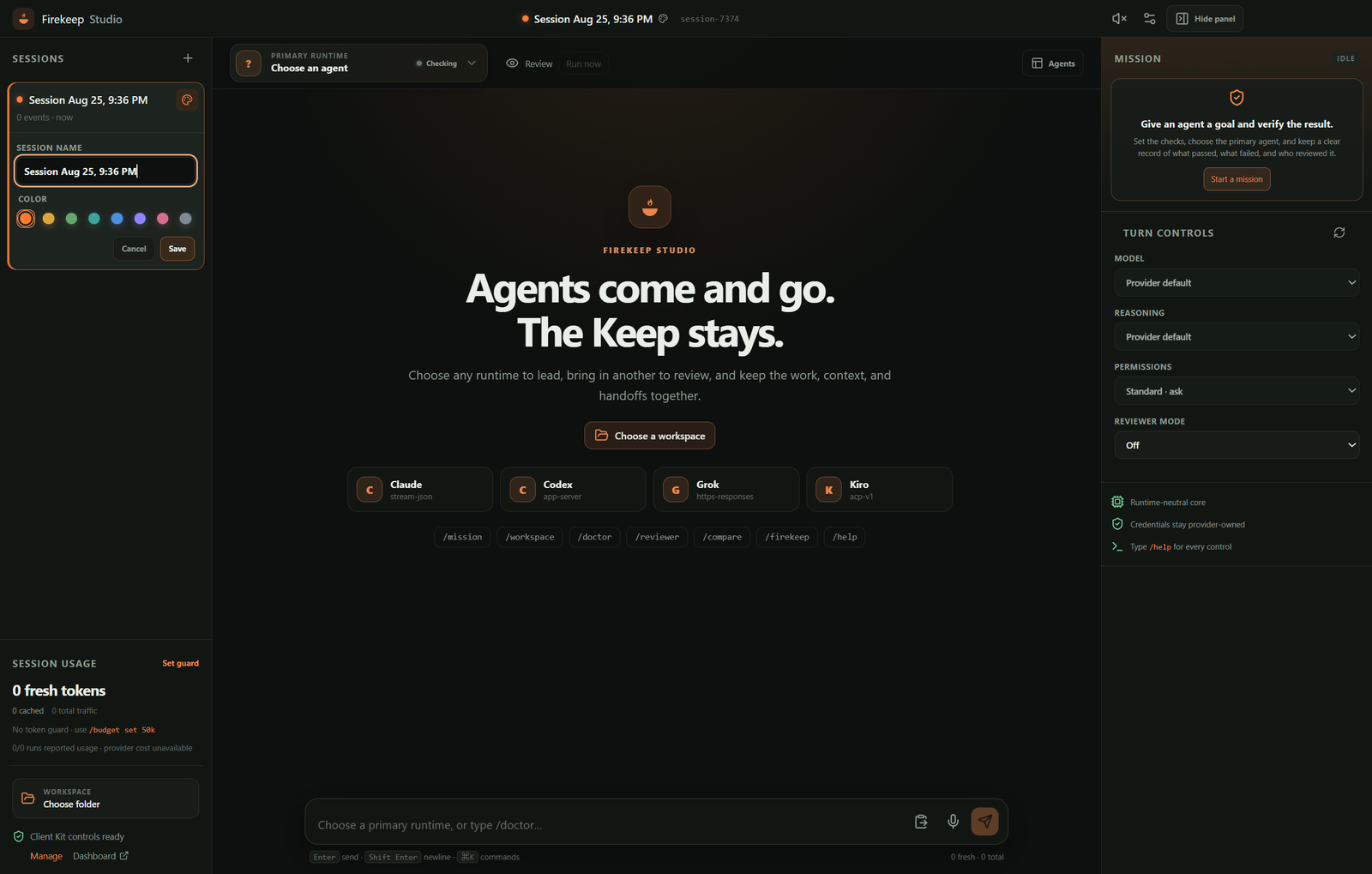
Named local sessions and a chosen workspace make the next turn easy to find.
One explicit primary leads. Fresh, read-only reviewers add perspective without taking over.
Missions pair the work with deterministic local checks, bounded repair, review evidence, and your final acceptance.
Studio uses your installed Codex, Claude Code, or Kiro CLI. Grok connects directly with an xAI key protected by your operating system.
Run Windows Setup, or open the Mac DMG and move Firekeep Studio to Applications.
Select the project folder every runtime should use. Studio remembers it locally for the next session.
Choose the agent that leads the conversation, then connect its provider account if Studio asks.
Run /doctor, send your first prompt, then add a reviewer or create a Mission when the work needs proof.
04 / under the hood
Connected MCP agents call one local gateway. Behind it, your self-hosted Keep carries working knowledge, session state, procedures, coordination, and evidence across the tools you already use.
Explore the self-hosted MCP memory server one firekeep gatewaystdio · identity · routing
Cortexmemory · RAG · skills
Bridgesessions · replay
Relaytasks · coordination
Sentinelenvironment events
Self-hosted core. Server, datastores, embeddings, and default inference run on infrastructure you control.
Your connections. Model providers and optional integrations follow the services you configure.
Connected by MCP. Supported client hooks add automatic briefings and lifecycle guidance.
What your Keep carries
Each part stays connected to its project and provenance, so the right context can return without becoming a pile of disconnected notes.
Decisions, facts, proven fixes, and selected documents stay connected to their source and relationships.
memory · provenance · DocdexGoals, plans, decisions, progress, and file notes carry through compression, handoff, and tomorrow’s session.
briefing · shadow · resumeReusable Skills and document-derived drafts turn hard-won fixes into reviewable team practice.
skills · drafts · runbooksTasks, messages, presence, handoffs, and fenced resource leases help agents and teammates coordinate.
relay · leases · presenceFirekeep-mediated replay, declared outcomes, and evaluation receipts make important work inspectable.
replay · outcomes · evalsDocdex covers selected documents, Symdex maps code, and Maildex adds member-private, read-only mail recall.
Docdex · Symdex · Maildex · explore ↗05 / evidence
Firekeep is measured in real work across development and operations. Baselines stay baselines, uncertainty stays visible, and the methods and result data are open to inspect.
Firekeep retrieved an evidence-bearing session for 459 of 470 scored questions. This measures retrieval, not generated-answer accuracy.
Weeks after a difficult deployment fix, the relevant procedure returned in a pre-flight briefing to an agent that had never seen the original incident.
18 of 32 sessions met the frozen recall predicate. A newly shipped action-declaration instruction began at 0 of 32 and later moved to 1 of 35; exposure receipts now separate exposed, not exposed, and unknown sessions.
06 / install Firekeep
Give your decisions, documents, procedures, and working context a durable place to live—then connect the agents and teammates who should build on them.
$ curl -fsSL https://firekeep.ai/latest/install | shPS> irm https://firekeep.ai/latest/install.ps1 | iexFree for self-hosted internal use by individuals and teams during early access. No Firekeep account or licence key required.
Source-available under BUSL-1.1. Each release converts to Apache-2.0 four years after publication.